
How to make an Ozil goal AI video
Make mine with one photoThere are three ways to make an Ozil goal AI video: prompt an AI video tool like Dreamina or Kling, give a tool your photo plus the goal clip to copy, or drop one photo into a finished clip. Which one fits depends on whether you want to direct your own version of the run, or get a finished run with the keeper, the defenders and the soundtrack already in place.
- One photo, no prompt
- Works in your browser, no app
- The clip's original soundtrack
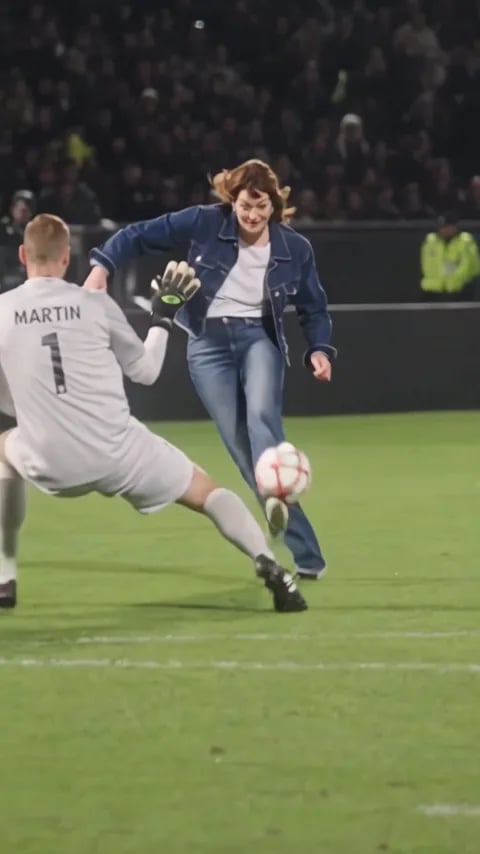
3 ways to make an Ozil goal AI video
Each way asks for something different, and gives you a different clip. Apps are named only as examples.
| Prompt a video toole.g. Dreamina, Kling | Photo + the goal clipA tool copies the run's motion | One finished clip (this site)You in a ready-made runUse my photo | |
|---|---|---|---|
| You supply | A photo, plus a prompt you write | A photo, a goal clip to copy, plus a prompt | One photo of a person or a pet |
| The run | A new scene each time: the stadium, keeper and defenders are made up | Follows the clip you give it, as closely as the tool manages | The same run every time: the diving keeper, the flick, the defenders in green |
| Sound | Depends on the tool; often crowd noise or none | Depends on the tool | The clip's original soundtrack |
| Clip length & format | Depends on the tool; short clips can end before the ball goes in | Depends on the tool and your clip | 10 seconds, 9:16, 720p |
| Effort | Write and rewrite the prompt, try a few times | Find a clip, write the prompt, check every touch | Add a photo, generate |
| Price | See the app's plans | See the app's plans | Packs from $9.90 (1 video), one-time |
Want the finished run with you on the ball?
No prompt, no clip to find, no editing.
Which way fits you?
Prompt a video tool: you want your own version
Dreamina, Kling and similar tools turn your photo and a prompt into a new scene, so you choose the kit, the stadium and how the goal goes in. The trade-off is that the keeper, the defenders and the pitch are invented each time, and it can take a few tries before the run reads as the Ozil goal.
Photo + the goal clip: you want the real run's moves
Some tools take a reference video next to your photo and copy its motion and camera, so the run follows the clip you give them. You still write the prompt and check the result touch by touch, because the ball and the defenders are where these clips most often go wrong.
One finished clip here: you want the trend version, fast
The 10-second clip is already made: the run at the keeper, the flick over the dive, the defenders in green and the original soundtrack. Add one photo of a person or a pet, and only the player changes.
How to write an Ozil goal AI prompt
This is how public guides for the trend lay the prompt out: one labelled scorer and the run in beats. Treat it as a starting point; we have not tested these prompts ourselves.
- 1
Label who is who
Name your photo as the scorer, for example Image 1 (media.io's Ozil goal page, for example, writes it as @Image1). If your tool takes a reference video, say so too: "@Video1 as the motion and camera reference".
- 2
Beat 1: the keeper rushes out
Image 1 runs at goal with the ball as the keeper in white comes off his line. Short phrases set the scene: "floodlit stadium at night, wet grass".
- 3
Beat 2: the chip over the dive
Image 1 flicks the ball up and over the diving keeper. Ask for one ball, so it doesn't split or float.
- 4
Beat 3: the defenders slide past
Image 1 keeps the ball up, and two defenders in green slide in and miss.
- 5
Beat 4: the finish
Image 1 rolls the ball into the empty net. Give the finish its own beat, or a short clip can end before the goal.
- 6
Say what stays and what to leave out
End with the rules: same face and clothes as Image 1 in every frame, replace only the player with the ball, no extra players, no text or logos, and no likeness of real public figures. Only use photos of yourself or adults who agreed.
Common problems and what guides suggest
These are fixes that prompt guides recommend, not results of our own tests.
The face or the outfit drifts
Repeat "same face and clothes as Image 1" and use a photo where the whole person is visible, not just the face.
The ball floats or jumps
Ask for one ball, check every touch, and regenerate. Fewer beats per clip helps.
The wrong player changes, or there are two of you
Say "replace only the player with the ball", and add "no extra players, no duplicate".
The clip ends before the goal
Pick a longer duration if the tool has one, or drop a beat so the finish fits.
How to make an Ozil goal AI video on this site in 3 steps
- 1
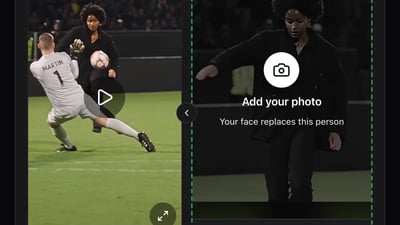
Pick one clear photo
One person or one pet, facing the camera, with the whole face visible. Use yourself, or an adult who agreed to be in it.
- 2
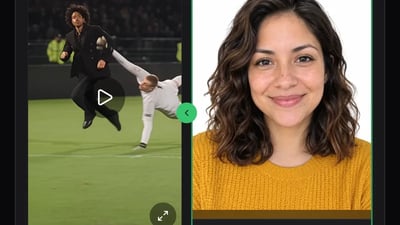
Add it to the player slot
Drop the photo into the slot, tick the consent box and press Generate video.
- 3
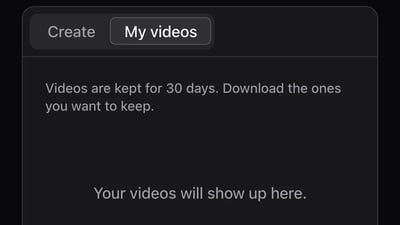
Pick it up in My videos
Close the tab if you like. The video shows up in My videos when it's ready and stays there for 30 days to download or share.
Make your Ozil goal AI video with one photo
Add a photo for the player with the ball. No prompt and no editing: the keeper, the defenders and the soundtrack stay as in the clip.
The clip your photo goes into · 10 s · 9:16
One person per photo, face clearly visible. JPG, PNG or WebP up to 10 MB.
- No app
- No watermark
- Credits back if a video fails
Making an Ozil goal AI video: questions
When we checked CapCut's own template library on 16 October 2026, we found general "scoring a goal" templates but none for the Ozil goal. Template links shared on TikTok come and go, so check that the one you find still works.
Some prompt tools have a free tier, so check each app's plans. On this site it isn't free: each video uses 600 credits from a one-time pack, starting at $9.90 for one video. The small sign-up bonus doesn't cover a video, and failed videos give their credits back.
There is no one agreed song. Some tools give you crowd noise or no sound at all. The clip on this site keeps its original soundtrack, and you can pick a different song in TikTok or Instagram when you post.
Here, pets can work too: use one clear photo of the pet facing the camera, with nothing else in the frame. With a prompt tool you describe the scorer yourself, so a pet version is up to your prompt.
The clip on this site is 10 seconds, a 9:16 MP4 at 720p. With prompt tools it depends on the tool and the duration you pick; keep it long enough for the finish.
No. The trend is based on Mesut Özil's goal for Arsenal at Ludogorets in November 2016, but the clip here is a restaging of the run, and prompt tools make up a new scene altogether.
It depends on what you want. Your own version, and time to try: a prompt tool. The real run's moves with more control: a photo plus the goal clip. The trend version with its soundtrack and no prompt: add one photo here.